> For the complete documentation index, see [llms.txt](https://unixx.shop/docs/llms.txt). Markdown versions of documentation pages are available by appending `.md` to page URLs; this page is available as [Markdown](https://unixx.shop/docs/games/rocket-league-bot-setup-download-and-installation-guides/choose-a-rocket-league-bot-setup-guide/averia-ai-bot-setup-guides-for-rocket-league/download-and-install-averia-rocket-league-ai-bot.md).
# Download and Install Averia Rocket League AI Bot
Download and install Averia Rocket League AI bot with loader steps, Discord overlay settings, game configuration, and support resources.
## Download and Install Averia Rocket League AI Bot
Install Averia Rocket League AI Bot by activating your key, configuring Discord and Rocket League, then running the official loader.
### Redeem your Averia license key
If you have not already, redeem your license key directly in the loader.
{% content-ref url="/pages/MveTbtqyzS7YrqG6mrBa" %}
[Redeem Your Averia Rocket League AI Bot Key](/docs/games/rocket-league-bot-setup-download-and-installation-guides/choose-a-rocket-league-bot-setup-guide/averia-ai-bot-setup-guides-for-rocket-league/activate-averia-rocket-league-ai-bot-key.md)
{% endcontent-ref %}
### Disable your antivirus
Disable all antivirus software, including Windows Defender, before use. Our software may trigger false alerts, but all products are rigorously tested and widely trusted.
{% content-ref url="/pages/5bVdAx1rD3r6uKIXtyie" %}
[How to Disable Antivirus](/docs/about/unixx-product-faq-and-troubleshooting/how-to-disable-antivirus.md)
{% endcontent-ref %}
### Install Averia Rocket League AI Bot
1. Download the loader [HERE](https://loader.unbanned.gg/download).
2. Turn on discord overlay.
* Turn on **Discord Legacy Overlay**
* Disable **Standard Overlay**
* Enable **Overlay & Detection for Rocket League**
Shown below:
3. Ensure all required Discord overlay indicators are enabled (none should be red).
4. Disable Windows Defender / antivirus before launching.
5. Disable Core Isolation.
6. Set Rocket League to **Borderless Windowed Mode** in video settings:\

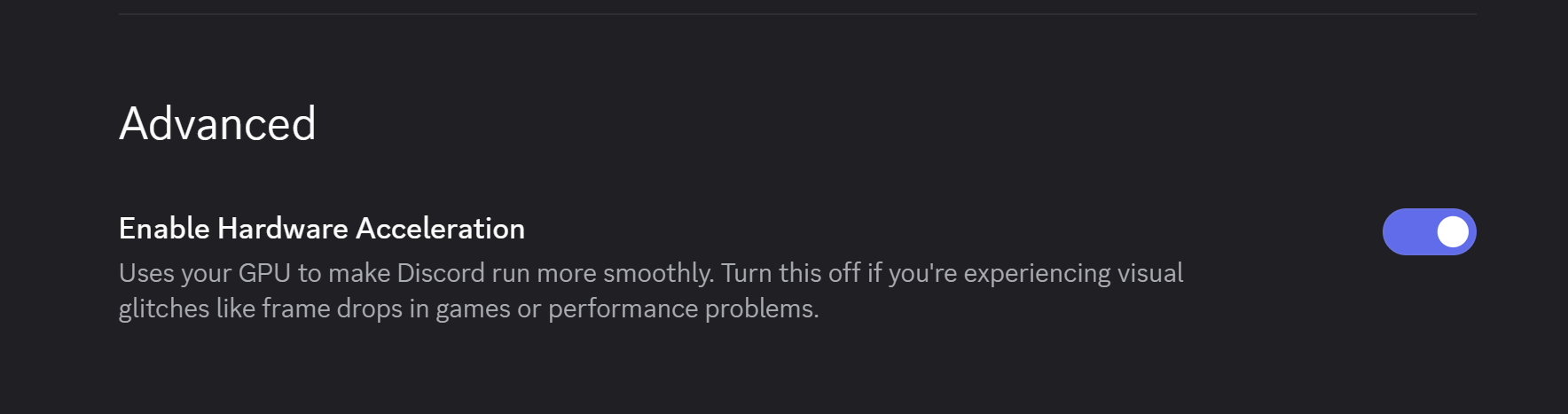
7. Make sure hardware acceleration is turned on in Discord appearance settings.
8. Run the loader as administrator.
9. Click **Load** and wait until prompted to launch Rocket League.
10. Launch Rocket League when instructed.
11. Press **F8 in-game** to open the software.
### In-game setup
These options must be enabled in setup to ensure everything works correctly.
{% hint style="danger" %}
Make sure the game is not in Fullscreen or menu will not show.
{% endhint %}
{% hint style="warning" %}
Please note that the Bot works EXCLUSIVELY in 2v2 match modes.
{% endhint %}
{% hint style="danger" %}
FPS MUST BE CAPPED TO 120FPS. USE BOT ON ALT ACCOUNTS. (Bot may be risky)
{% endhint %}
Use the following in-game settings for the best results:
* Steering Sensitivity 1.00
* Aerial Sensitivity 1.00
* Steering Sensitivity 1.00
* Aerial Sensitivity 1.00
* Controller Deadzone 0.00
* Dodge Deadzone 0.50
* Controller Vibration Default
* Vibration Intensity 0.00
* Ball Camera Mode Toggle
* Mouse Sensitivity 1.00
* Keyboard Input Acceleration Time 0.00
* Rumble Activation Buffer 0.00
* Keyboard Aerial Safety Off
#### ⚠️ Important Notes
* Discord may restart automatically on first launch or after updates — this is normal
* Always enable Discord overlay before loading
* If the menu does not show, restart Discord and try again.
{% hint style="danger" %}
**Experiencing Issues?**
* If you're crashing, can't inject, or running into other common issues, check our [Averia Support Page](/docs/games/rocket-league-bot-setup-download-and-installation-guides/choose-a-rocket-league-bot-setup-guide/averia-ai-bot-setup-guides-for-rocket-league/averia-rocket-league-ai-bot-support-and-troubleshooting.md) for quick fixes and setup help.
* If you're still having problems after that, open a support ticket in the Unixx [discord](https://discord.com/invite/unixx) for direct assistance.
{% endhint %}
### Averia Rocket League AI Bot video tutorial
### Frequently Asked Questions
#### Which Rocket League mode supports the bot?
The bot works exclusively in 2v2 match modes.
#### Why does the menu not appear?
Use Borderless Windowed mode. Restart Discord if the menu still does not appear.
---
# Agent Instructions
This documentation is published with GitBook. GitBook is the documentation platform designed so that both humans and AI agents can read, navigate, and reason over technical content effectively. Learn more at gitbook.com.
## Querying This Documentation
If you need additional information that is not directly available in this page, you can query the documentation by asking a question.
Perform an HTTP GET request on the following URL with the `ask` and `goal` query parameters:
```
GET https://unixx.shop/docs/games/rocket-league-bot-setup-download-and-installation-guides/choose-a-rocket-league-bot-setup-guide/averia-ai-bot-setup-guides-for-rocket-league/download-and-install-averia-rocket-league-ai-bot.md?ask=&goal=
```
`ask` is the immediate question: it should be specific, self-contained, and written in natural language.
`goal` is what the user is ultimately trying to achieve, the reason they need the answer. Sharing it helps GitBook give you a better, more relevant answer. A goal is most helpful when it describes the outcome the user wants rather than restating the question. For example, with `ask=how do I create an API token`, a goal like `automate deployments from our CI pipeline` lets GitBook tailor the answer to that use case.
The response will contain a direct answer to the question and relevant excerpts and sources from the documentation.
Use this mechanism when the answer is not explicitly present in the current page, you need clarification or additional context, or you want to retrieve related documentation sections.