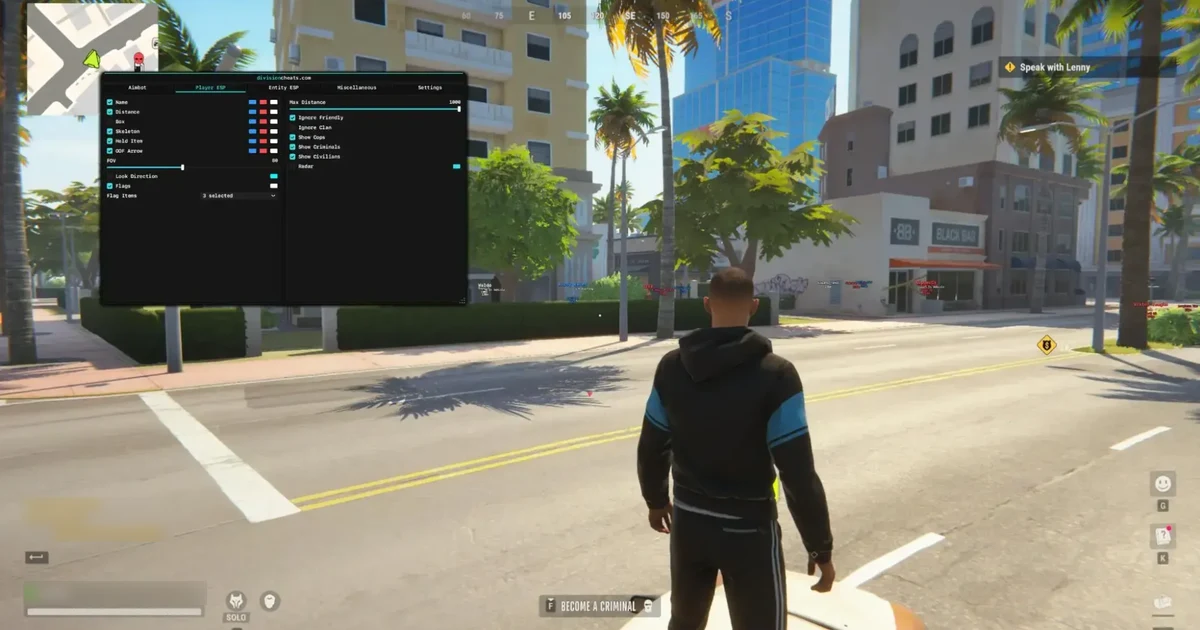
The best Rob Run cheat in 2026 is one built for how Rob Run actually plays: a huge shared city where the cops and criminals around you are other players, and where loot, vehicles and guards matter as much as gunfights. Division Rob Run Cheat covers all of it from one menu, with Memory Aimbot, Silent Aim, Bullet TP, Player ESP, Entity ESP, a radar, and No Recoil and No Spread.
This guide explains which features matter most in Rob Run, how Division handles each one, how to set it up, and what to consider before you buy.
Disclosure: Unixx.Shop sells Division Rob Run Cheat. It is the only Rob Run cheat we carry, so this guide judges it against what Rob Run players need rather than against other products.
Key Takeaways
- Rob Run rewards information. ESP that separates cops, criminals and civilians and shows loot value matters more here than in a pure shooter.
- Division combines three aim modes (Memory Aimbot, Silent Aim, Bullet TP) and a Trigger Bot with FOV, smoothness, bone, delay and distance controls.
- Entity and Item ESP mark weapons, cash, keys, vehicles, guards and traders, with filters for rarity, minimum value and distance.
- Rob Run uses kernel-level Easy Anti-Cheat, so no cheat is risk-free. Play on an account you can afford to lose.
Ready to buy already? Here is the short version:
Quick Pick: Division Rob Run Cheat
- Price: from $21.99 for 7 days ($32.99 for 30 days, $126.99 lifetime)
- Delivery: instant, straight to your Unixx.Shop dashboard
- Includes: Memory Aimbot, Silent Aim, Bullet TP, Trigger Bot, Player ESP with chams, Loot and Objects ESP, Radar, No Recoil and more
- Runs on: Windows 10 and 11, Intel or AMD, no BIOS changes
The rest of this guide breaks down each feature, the settings to start with, and which plan fits how you play.
What Is Rob Run?
ROB RUN is a free-to-play crime sandbox from developer Kefir that launched in Steam Early Access on November 4, 2026. Its Steam page calls it a brutal crime sandbox featuring thousands of players, and it lists Easy Anti-Cheat with a note that the game uses kernel-level anti-cheat (Steam store page, retrieved 2026-11-19).
In practice, a session mixes several jobs at once. You rob stores and vans, haul loot to a fence, dodge or fight police players, and deal with rival clans. That mix is why a good Rob Run cheat needs more than an aimbot.
What Makes a Rob Run Cheat the Best?
The best Rob Run cheats share four traits. Each one maps to a real part of the game:
| What you need | Why it matters in Rob Run | Division feature |
|---|---|---|
| Role-aware ESP | Cops, criminals and civilians share the same streets | Separate Cops, Criminals and Civilians filtering |
| Loot ESP with filters | Containers, vans and fences hold items of very different value | Item filtering by rarity, minimum value, name and distance |
| Flexible aim | Fights range from close-quarters raids to long street shots | Memory Aimbot, Silent Aim and Bullet TP |
| Status information | Knocked or arrested players change what you should do next | Player Status ESP for knocked, arrested, reloading, armor and activity |
A cheat that only draws boxes on players misses most of what makes Rob Run different from a standard shooter. Division, the developer behind the cheat, builds its menu around all four.
Aimbot Settings for Rob Run
Division offers three aim modes, each with its own keybind slot, plus fine controls that decide how aggressive the assistance feels.
Memory Aimbot, Silent Aim and Bullet TP
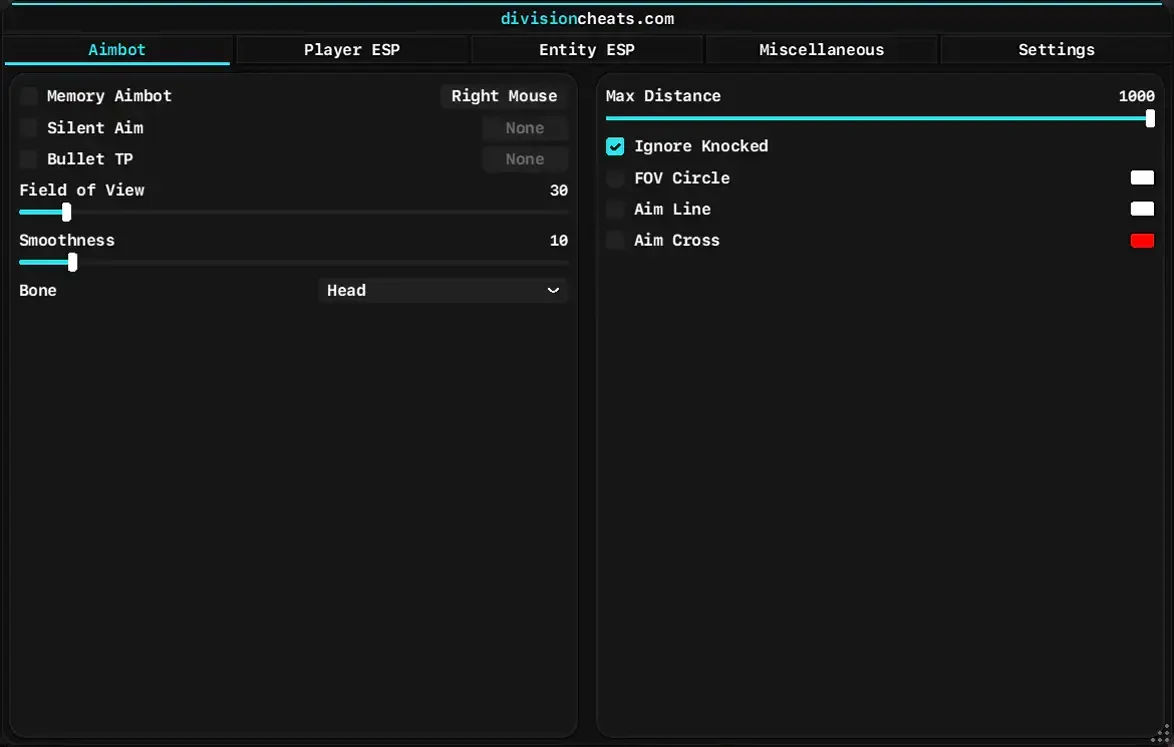
- Memory Aimbot moves your crosshair onto the target while you hold its aim key (Right Mouse in the screenshot above).
- Silent Aim is a separate mode with its own keybind, designed to assist shots without a visible camera snap.
- Bullet TP (also known as “TP shoot”) has its own keybind and teleports your bullets to the target instead of relying on normal bullet travel, so it is the least natural-looking of the three modes.
Aim Settings You Can Tune
- Field of View: how far from your crosshair the aimbot looks for targets.
- Smoothness: controls how gradually the aim moves onto the target.
- Bone selection: which part of the body the aimbot targets (Head in the screenshot).
- Maximum Distance: ignores targets beyond a set range (up to 1000 in the menu).
- Ignore Knocked: skips players who are already down.
- FOV Circle, Aim Line and Aim Cross: visual guides with custom colors.
A Subtle Starting Config
The menu screenshot above shows a sensible low-key baseline:
| Setting | Value |
|---|---|
| Aim mode | Memory Aimbot (tick to enable), key Right Mouse |
| Field of View | 30 |
| Smoothness | 10 |
| Bone | Head |
| Ignore Knocked | On |
From there, lower the FOV or raise smoothness for a more natural look. Switch to Silent Aim or Bullet TP only if you want aggressive play and accept the higher risk.
Trigger Bot
The Aimbot tab has a second page for a Trigger Bot, which fires for you when a target is under your crosshair.
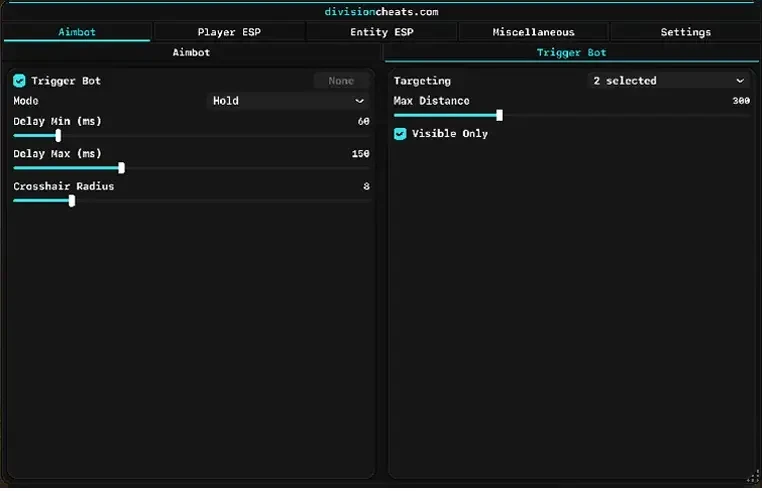
The menu capture shows these settings:
- Mode: Hold (fires only while you hold its key)
- Delay Min and Delay Max: a random delay range, 60 to 150 ms in the screenshot, so shots don’t fire with robotic timing
- Crosshair Radius: how close to the crosshair a target must be (8 in the screenshot)
- Targeting: which player groups it reacts to
- Max Distance: 300 in the screenshot
- Visible Only: ignores targets behind walls
You can try these aim settings yourself with the Division Rob Run Cheat.
Player ESP: See Every Cop, Criminal and Clan
Player ESP shows who is around you and what they are doing, which matters in a city where any player could be a cop, a rival crew or a target.
Division’s Player ESP includes:
- Names, distance, boxes and skeletons for every visible player
- Held items, so you can see what weapon someone is carrying before you engage
- Off-screen arrows and look direction, which warn you about players behind you or watching you
- Clan tags, to identify rival crews
- Status flags for knocked, arrested, reloading, armor and activity
- Cops, criminals and civilians filters, plus Ignore Friendly and Ignore Clan options so your own crew never clutters the screen
- Radar, a top-down view of nearby players for extra awareness
The status flags are the standout for Rob Run. Knowing a player is reloading or already arrested tells you whether to push, wait or leave.
Chams, Visibility Colors and Awareness Tools
The full Player ESP tab goes further than boxes and names:
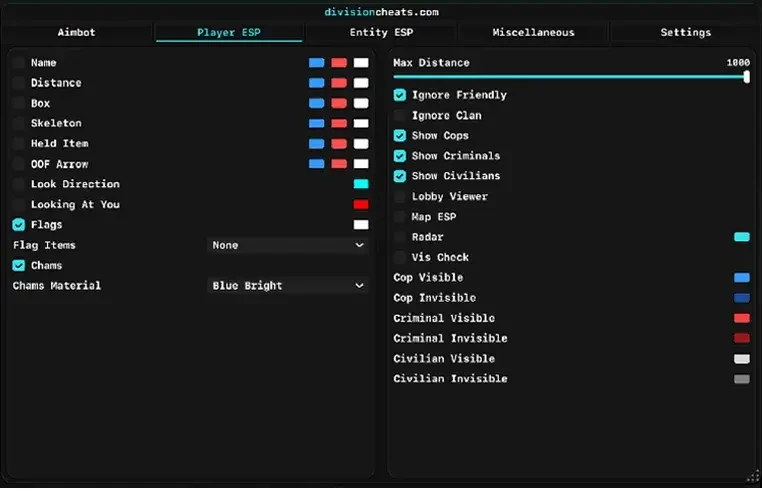
- Chams color player models through walls, with a choice of material (Blue Bright in the screenshot).
- Looking At You highlights players who are looking toward you.
- Vis Check with separate visible and invisible colors for cops, criminals and civilians, so you can tell at a glance who has line of sight.
- Lobby Viewer and Map ESP options, alongside the on-screen Radar.
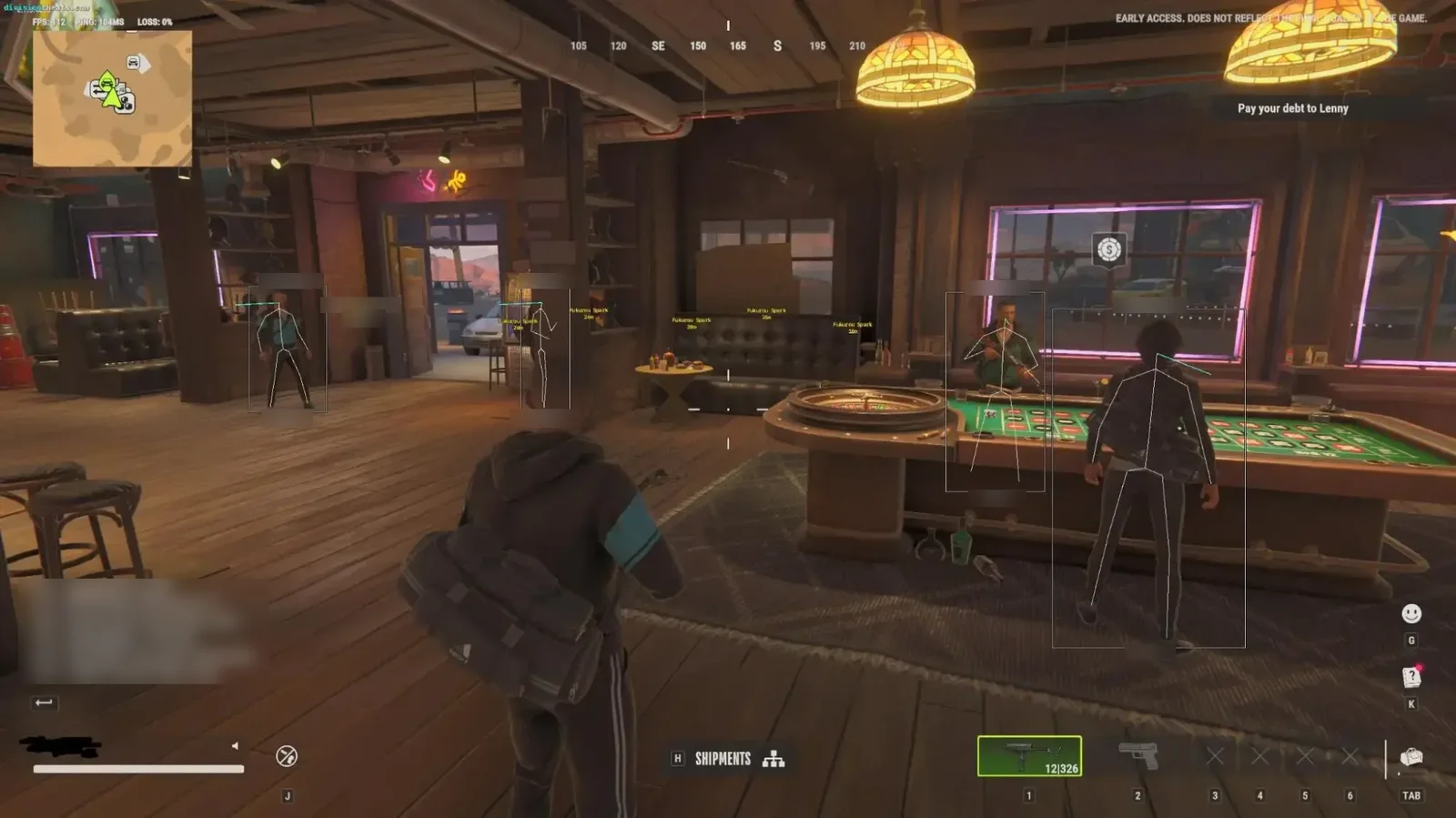
Here is what skeleton and box ESP look like in a busy casino, with each player marked through the crowd:
Loot and Entity ESP: Find the Valuable Items First
Loot is the point of most Rob Run sessions, and Division’s Entity ESP is built around finding it fast.
- Entity ESP for weapons, ammo, equipment, medicine, grenades and valuables
- Item ESP for keys, tools, cash and other loot
- Item filtering by rarity, minimum value, name and distance
- Vehicle ESP for cars
- Guard and Trader ESP with names, distance, state and status
- Grenade ESP with trajectory visualization, so you see where a grenade will land
Item filtering is the feature to set up first. Raise the minimum value and only high-value loot stays on screen, which keeps the view clean during a busy run.
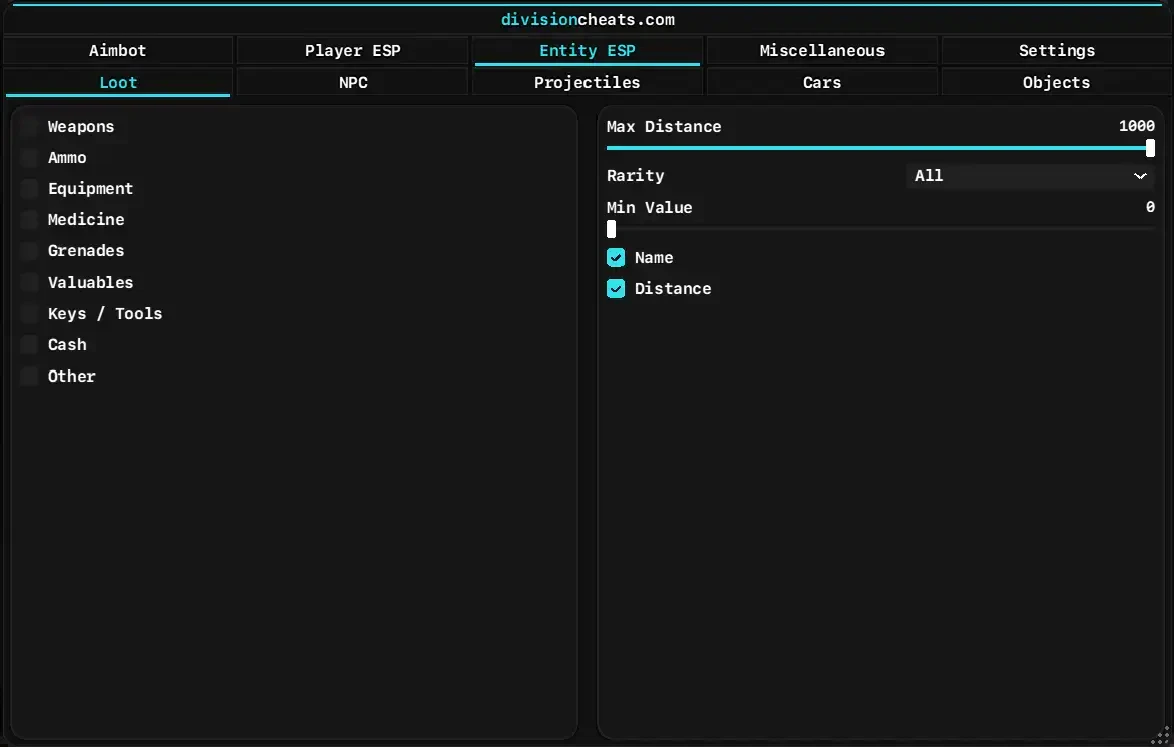
The Loot tab lists each category (weapons, ammo, equipment, medicine, grenades, valuables, keys and tools, cash, other), with a Rarity dropdown and a Min Value slider that starts at 0.
A Starting Loot Filter, Based on Real Item Values
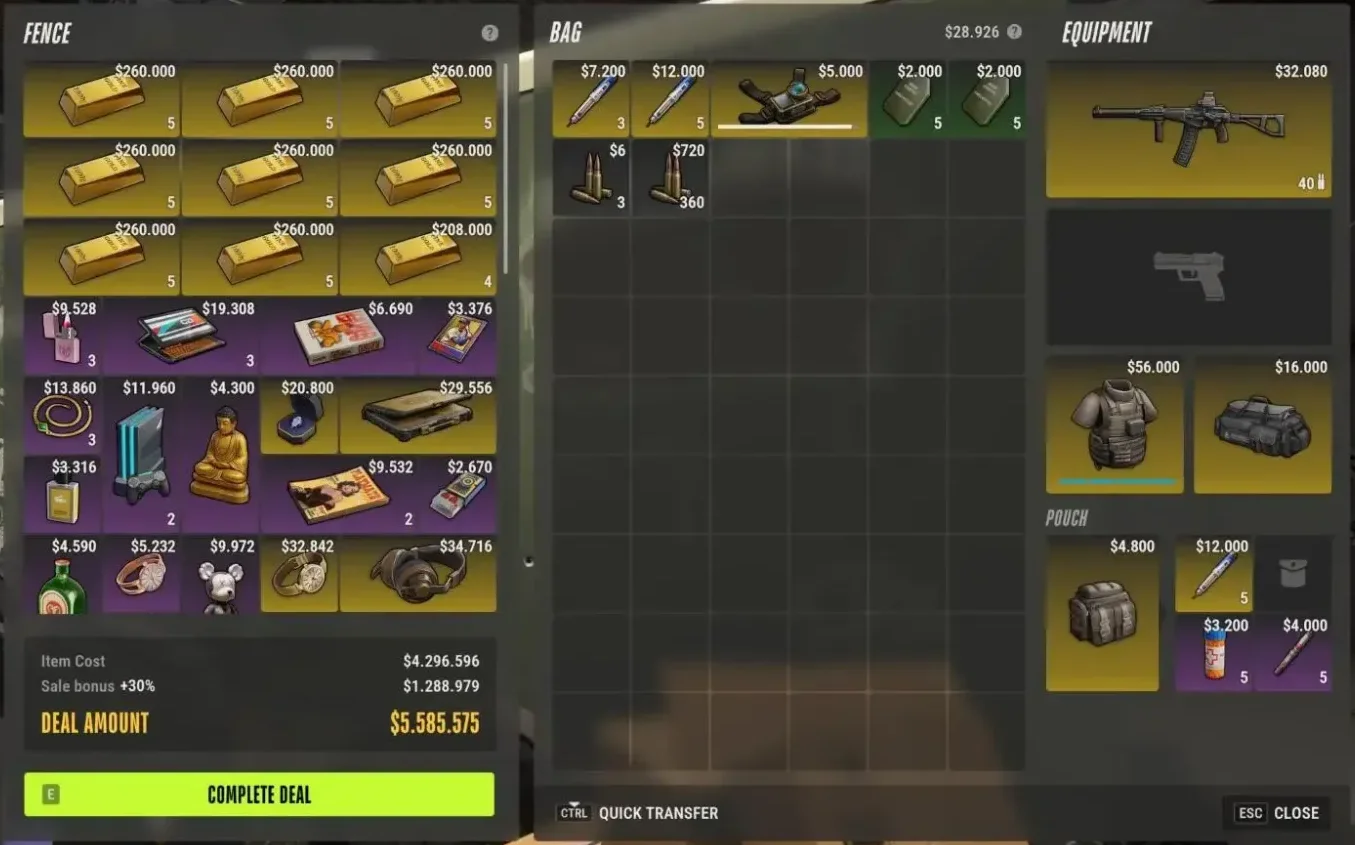
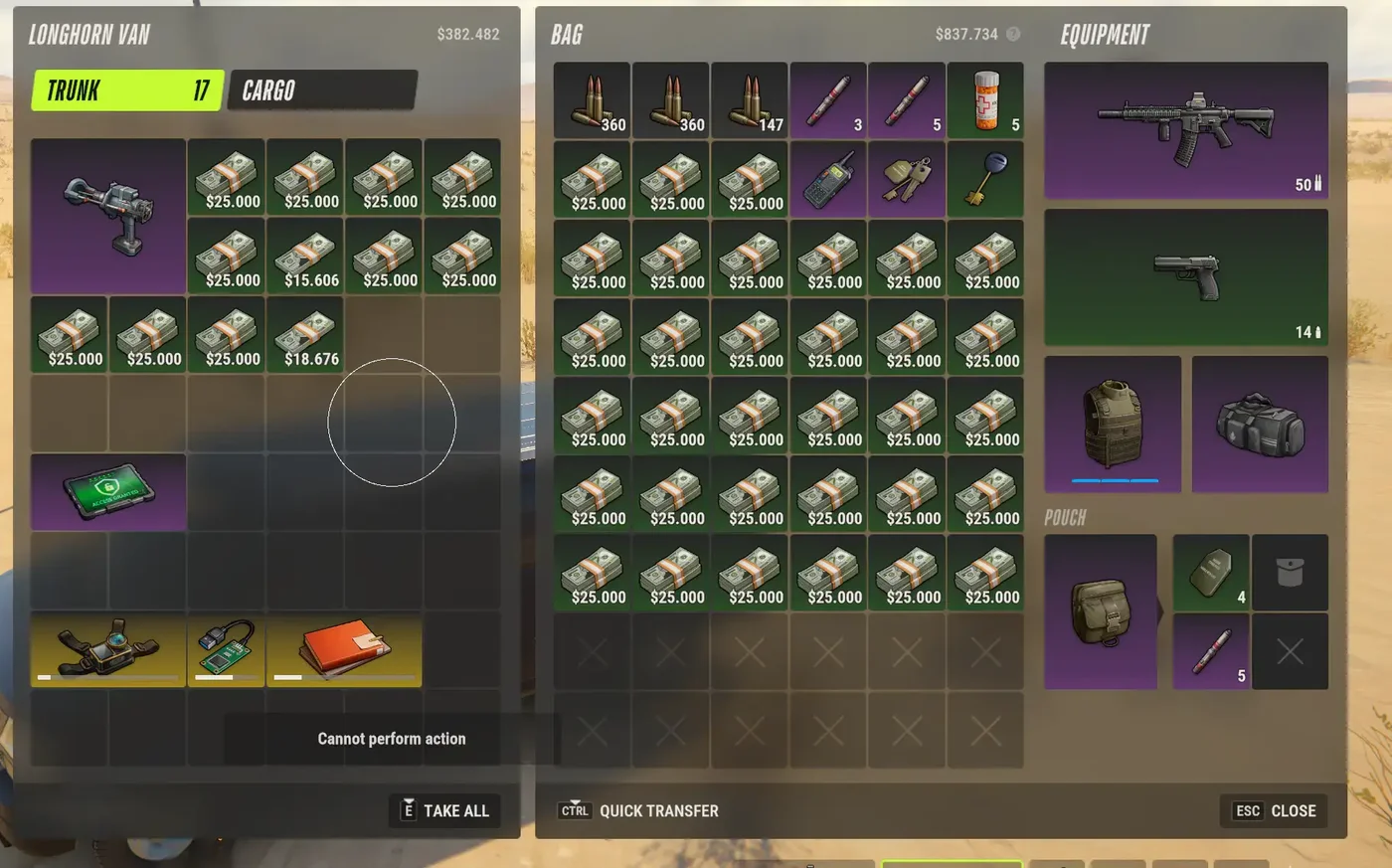
The in-game screenshots in this guide show how wide Rob Run’s value range is:
| Item (from the screenshots) | Value shown (per inventory slot) |
|---|---|
| Ammo stacks | $6 to $720 (about $2 per round) |
| Small valuables (jewelry, electronics, collectibles) | about $2,700 to $35,000 |
| Cash stacks | up to $25,000 per stack |
| Gold bars | $260,000 per stack of 5 (about $52,000 per bar) |
Based on those values, a minimum value of about $10,000 is a sensible first setting. It hides ammo and cheap clutter but keeps cash stacks, gold and the better valuables on screen. Drop it to around $3,000 when you want every sellable valuable, or raise it toward $25,000 when you only want full cash stacks, gold and the priciest valuables. These are starting points drawn from the screenshot values, so adjust them to the run you are doing.
Objects, NPC, Car and Grenade ESP
Entity ESP has four more pages beyond loot, each with its own distance slider (up to 1000):
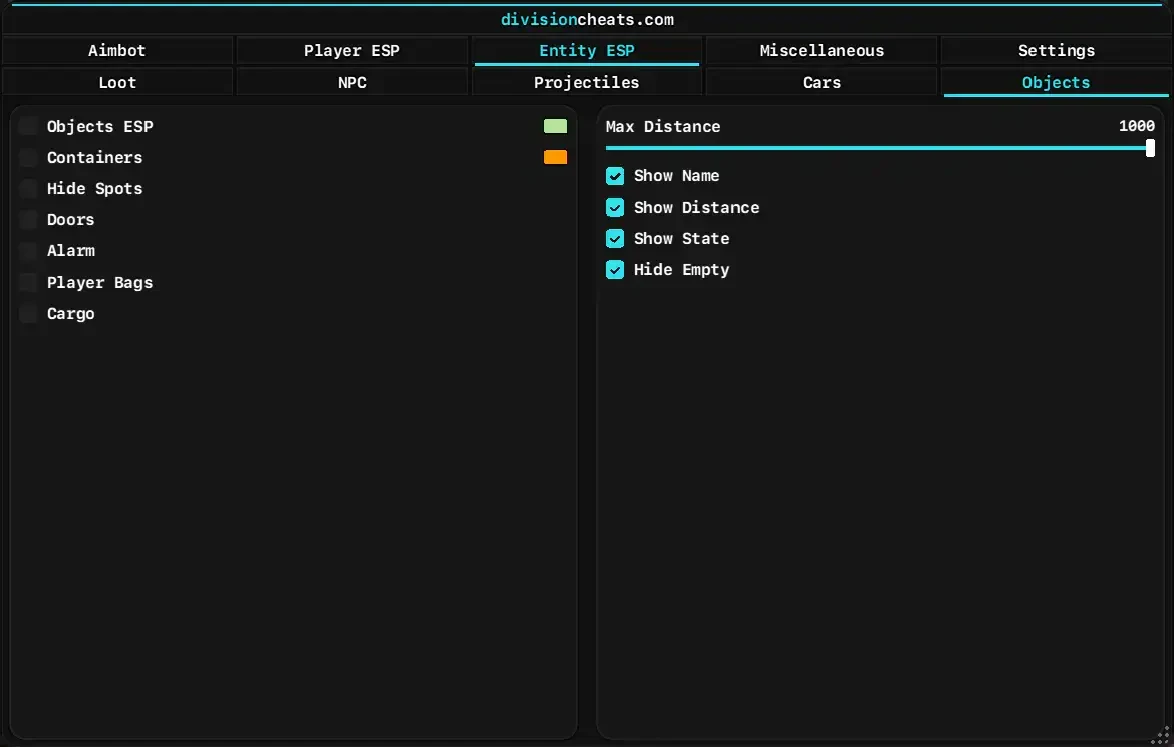
- Objects: containers, hide spots, doors, alarms, player bags and cargo, with name, distance and state, plus Hide Empty so looted containers drop off the screen.
- NPC: guards and traders with state, name and distance, and a Show Dead option.
- Cars: car ESP with separate colors for cops, criminals and citizens.
- Projectiles: grenade ESP with names and trajectory.
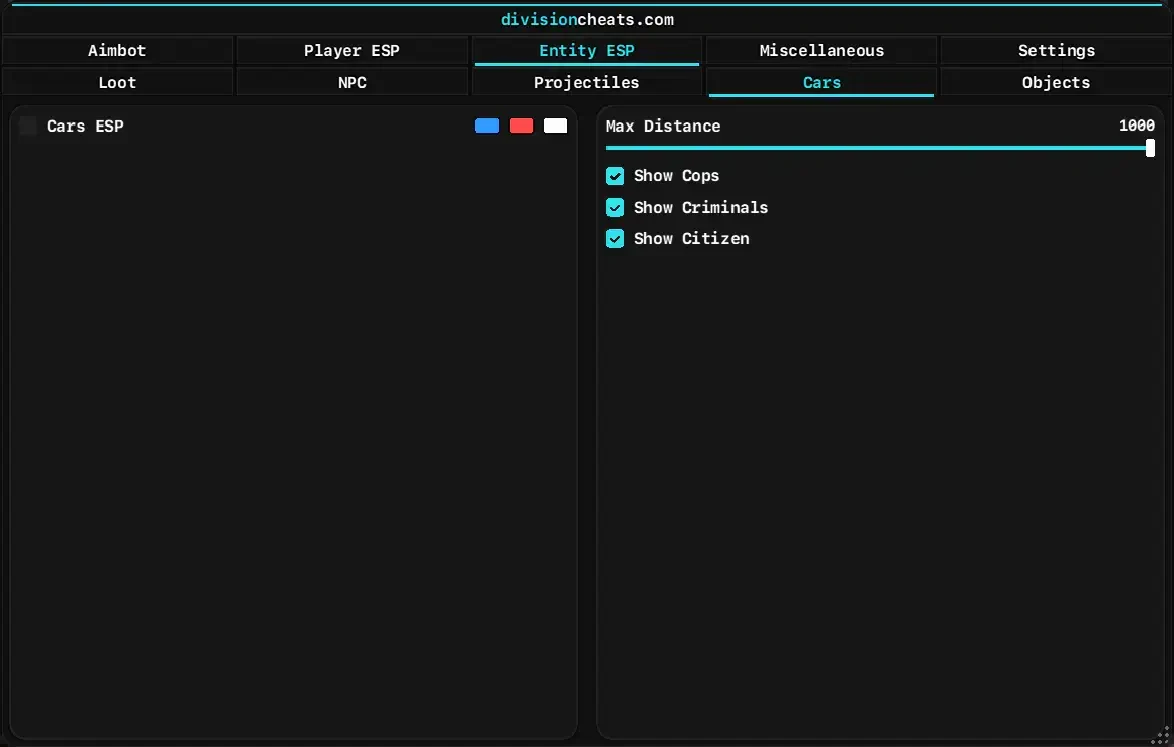
Alarms and hide spots are the Rob Run-specific picks here: you can mark alarms and doors before you rob a place, and see where the hide spots are when police arrive.
Every ESP page above is part of the Division menu, and the pricing section below shows what each plan costs.
UghLuciano’s Take
In my opinion, Division is one of the best Rob Run cheats out there. The magic-bullet style aim from Silent Aim and Bullet TP (also called TP shoot) is the highlight for me. Pairing the aimbot with ESP makes money runs much faster: ESP shows you where the cash and valuables are, and the aimbot deals with anyone guarding them.
Extra Features: No Recoil, Instant Search and More
The Miscellaneous tab holds the rest of the toolkit:
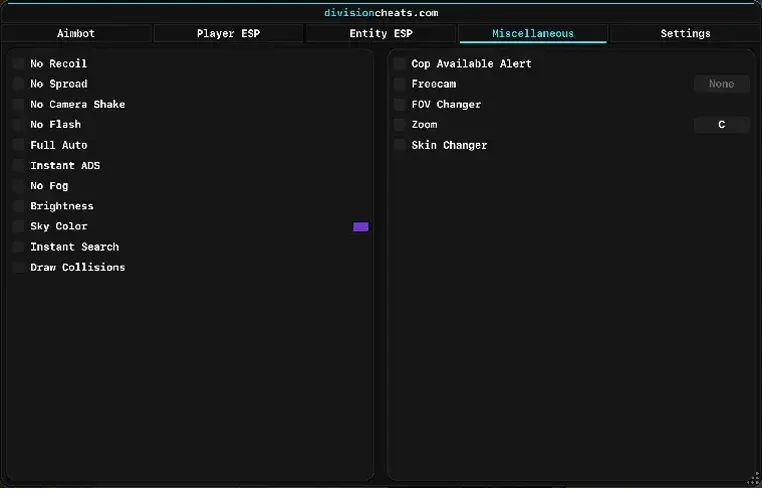
- Weapon handling: No Recoil, No Spread, No Camera Shake, Full Auto and Instant ADS
- Visuals: No Flash, No Fog, Brightness, Sky Color and Draw Collisions
- Speed: Instant Search for loot without the usual wait
- Awareness: Cop Available Alert, Freecam, FOV Changer and Zoom (bound to C in the screenshot)
- Cosmetic: Skin Changer
Separately, the product page lists config support, so you can save and load your settings.
Division Rob Run Cheat Pricing: Which Plan Should You Pick?
At the time of writing (November 19, 2026), Division Rob Run Cheat is sold in three plans:
| Plan | Price | Cost per day | Best for |
|---|---|---|---|
| 7 Days | $21.99 | about $3.14 | Trying every feature before committing |
| 30 Days | $32.99 | about $1.10 | Regular play: about a third of the per-day cost of the 7-day plan |
| Lifetime | $126.99 | one payment | Long-term players; it costs less than four 30-day plans |
If you just want to see the ESP and aimbot in action, start with 7 days. If you will play for more than a week, the 30-day plan already saves you money: two 7-day plans cost $43.98, while 30 days is $32.99, about a third of the per-day cost. If you expect to keep playing Rob Run for four months or longer, Lifetime costs less than renewing monthly and you never have to renew.
Status on the product page: Undetected (checked November 19, 2026). Status can change after Rob Run updates, so confirm it on the product page before each session.
Stock and prices can change, so check the Division Rob Run Cheat page for current availability, and read the refund policy before buying.
Choose your Division Rob Run Cheat plan
Why Buy Division From Unixx.Shop
- Instant delivery: your key and download appear in your dashboard right after payment.
- Setup help: step-by-step documentation and a Discord where support answers setup questions.
- Track record: the product page shows a 4.9 rating from verified reviews and 18,000+ customers across the store (retrieved November 19, 2026).
- Clear policies: a published refund policy and terms, so you know what you are buying.
How to Set Up Division Rob Run Cheat
- Choose one of the Division Rob Run Cheat plans. Delivery is instant after payment.
- Open your Unixx.Shop dashboard to find your key and download.
- Follow the Division setup guide in the Unixx.Shop documentation before launching Rob Run.
- In game, open the menu, load or build a config, and start with the subtle aim settings above.
- If anything fails to load, ask in the Unixx.Shop Discord, where support answers setup questions.
Is Using a Rob Run Cheat Safe?
No Rob Run cheat is completely safe. Rob Run’s Steam page lists Easy Anti-Cheat at kernel level, and Kefir’s ROB RUN EULA names “using cheats, bots, scripts, macros, or other unauthorized software or tools” and “circumventing anti-cheat systems” as prohibited conduct (retrieved 2026-11-19). Breaking those rules can cost you your account.
To lower your risk:
- Use an account you are prepared to lose, not your main one.
- Start with subtle settings: low FOV, higher smoothness, and ESP before aggressive aim modes.
- Check the product page and Division setup documentation for the current status before each session, especially after a game update.
- If you have been banned before, read our guides in Avoid Game Bans, including the Averia Temp HWID Spoofer guide, to understand how hardware bans work.
- If Easy Anti-Cheat flags you, the Easy Anti-Cheat support site covers error codes and what to do if you are banned.
Rob Run is still in Early Access, so the game updates often. Any cheat may need time to update after a patch.
About This Guide
This guide is written and maintained by UghLuciano, the Unixx.Shop blog writer. He runs a YouTube channel with about 8,000 subscribers (November 2026) focused on legit CS2 gameplay. New to cheat types? Our Internal vs External CS2 Cheats guide explains the difference, and most of it applies to Rob Run too. Game details come from the ROB RUN Steam page. Features, prices and requirements come from the Division Rob Run Cheat product page, and the screenshots are in-game and menu captures from Unixx.Shop. Features shown in the menu captures but not on the product page (such as Trigger Bot, Chams, Objects ESP and the Miscellaneous tab) are described exactly as the screenshots show them. All were checked on November 19, 2026, and the guide is updated when the product or Rob Run changes.
Questions or corrections? Contact us on the Unixx.Shop Discord. See our Terms of Service, Refund Policy and Privacy Policy.
Frequently Asked Questions
What is the best Rob Run cheat?
The best Rob Run cheat has role-aware ESP (cops, criminals, civilians), loot ESP with value filters, flexible aim modes, and status flags like knocked and arrested. Division Rob Run Cheat, the one Unixx.Shop carries, has all four, plus a radar and No Recoil.
Does Division Rob Run Cheat have an aimbot?
It does. It includes Memory Aimbot, Silent Aim and Bullet TP, with adjustable field of view, smoothness, bone selection and maximum distance.
Can I filter ESP to show only valuable loot?
Item filtering lets you set rarity, minimum value, item names and distance, so only the loot you care about appears.
Can you get banned for cheating in Rob Run?
You can. Rob Run uses kernel-level Easy Anti-Cheat. Use an account you can afford to lose and keep your settings subtle.
What do I need to run Division Rob Run Cheat?
A Windows 10 or 11 PC with an Intel or AMD processor. No BIOS changes are required.
Get Started With Division Rob Run Cheat
Division gives you everything this guide covered in one menu: three aim modes plus a Trigger Bot, role-aware Player ESP with chams, loot ESP with value filters, Objects ESP for alarms and hide spots, and a full set of weapon and visual tweaks.
- Buy Division Rob Run Cheat: from $21.99, delivered instantly.
- Follow the setup documentation and apply the starting settings from this guide.
- Join the Unixx.Shop Discord for support and status updates after Rob Run patches.
Looking for other Rob Run tools? Browse the Rob Run cheats category.